UI vs UX: What’s the Difference Between UI & UX Design?
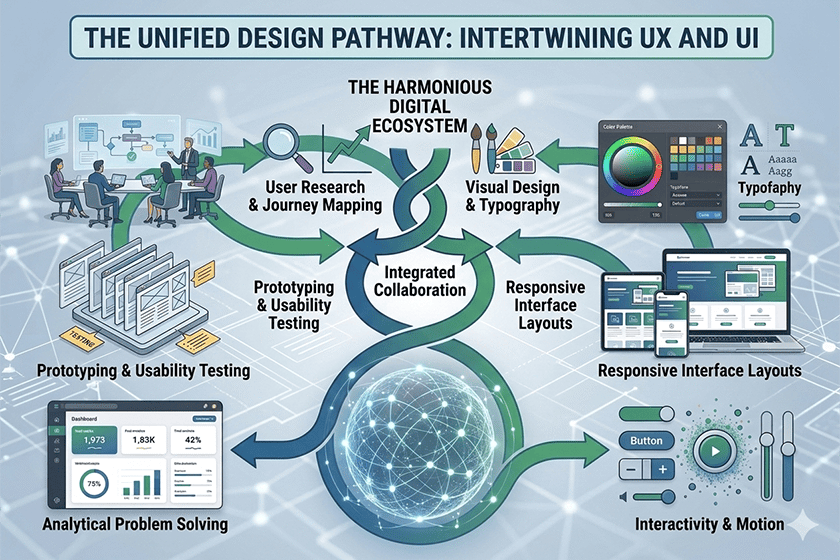
If you’ve ever wondered about the difference between UI and UX with example, you’re not alone. Many people use these terms interchangeably. UI and UX have similar-sounding names; they often work together. However, they have entirely different definitions and purposes.
For business owners, designers, developers, and even students considering a digital career, it is important to understand the difference between User Interface (UI) and User Experience (UX).
Let’s begin with an explanation of the terms in a straightforward, practical way that avoids unnecessary terminology.
What Is UI and UX Design?
Before comparing them, we need to define them properly.
What Is UX Design?
UX (User Experience) design focuses on how a product feels and functions for the user.
According to the Nielsen Norman Group, user experience (UX) includes every interaction a person has with a company, its products, and its services from the user’s point of view.
In simple terms, UX design is about ensuring the product is useful, easy to navigate, and logically structured.
A UX designer asks questions like:
- Is this app easy to use?
- Can users find what they need quickly?
- Does the checkout process feel smooth?
- Are there unnecessary steps?
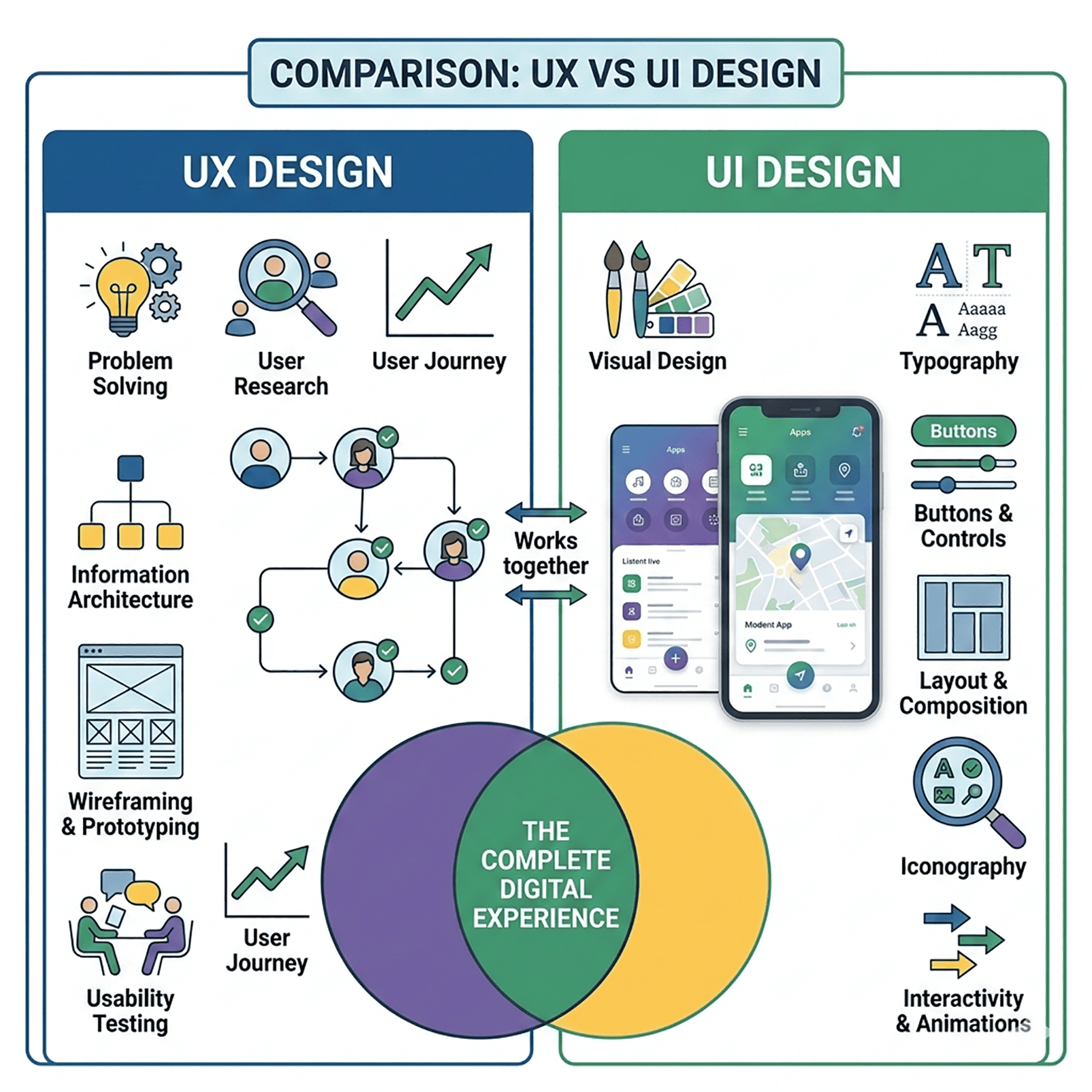
UX design involves:
- User research
- Wireframing
- Information architecture
- Usability testing
- Journey mapping
Problem-solving is what User Experience (UX) is all about.
Note: Our UI/UX design services turn visitors into loyal customers. Rated #1 for boosting conversions. Don’t miss out—get started now.
UX Design Key Features
The goal of User Experience (UX) design is to produce meaningful, usable and useful products for consumers. It goes beyond visuals and concentrates on how users interact with a product from start to finish.
Here are the key features of UX design that define a strong user experience:
1. User-Centered Design
UX design always starts with the user.
Designers research user needs, behaviours, and pain points before designing an item. They can create User Personas and User Journey Maps to understand user expectations in the real world better.
According to the Nielsen Norman Group, UX encompasses every aspect of a user’s interaction with a product—not just its user interface.
If the design does not benefit the user, it is a failure-regardless of how beautiful it may be.
2. Usability
Usability ensures users can complete tasks easily and efficiently.
Key usability factors include:
- Clear navigation
- Logical layout
- Minimal steps to complete actions
- Easy-to-understand labels
According to ISO 9241-11, usability is the extent to which a user can use a product effectively, efficiently, or satisfactorily.
Strong UX removes friction.
3. Information Architecture
Information architecture (IA) organizes content in a logical and intuitive way.
It answers questions like:
- How should pages be structured?
- What categories make sense?
- ow do users move through the system?
Good IA prevents confusion and reduces cognitive load.
4. Consistency
Consistency builds trust.
Users expect similar elements to behave the same way across pages. Layouts, buttons, and navigation menus should all adhere to recognizable patterns.
If the design of any part of the website is inconsistent, the user will have to learn how to use that portion of the site again each time they interact with it.
5. Accessibility
Inclusive design is a core UX principle.
Products should be usable by people with disabilities. This includes:
- Proper color contrast
- Keyboard navigation
- Screen reader compatibility
- Clear form labels
The W3C has created the Web Content Accessibility Guidelines (WCAG), an international standard for web accessibility.
6. Interaction Design
Interaction design focuses on how users engage with elements.
Examples include:
- Button feedback
- Loading indicators
- Error messages
- Micro-interactions
When interactions feel smooth and responsive, users feel in control.
What Is UI Design?
UI (User Interface) design focuses on how the product looks and visually communicates.
The user interface includes:
- Buttons
- Colors
- Typography
- Icons
- Layout
- Visual hierarchy
UX is the blueprint of a house; UI is the paint, lights, and furnishings that make that structure attractive and inviting.
UI designers work on:
- Visual design systems
- Branding alignment
- Micro-interactions
- Responsive layouts
UI is about presentation and visual clarity.
UI Key Features
UI (User Interface) design refers to the visual appearance of a digital product and how users interact with it. A well-designed UI improves clarity, fosters trust, and enhances usability.
Here are the top 5 key features of UI design:
1. Visual Hierarchy
Visual hierarchy guides users’ attention.
It uses:
- Font size
- Color contrast
- Spacing
- Layout structure
Important elements (like CTAs or headlines) stand out clearly. A clear hierarchy helps the user easily know where to focus and what actions to take next.
2. Consistency
Consistency makes interfaces predictable.
All buttons, icons, colors, and layouts should have a consistent design approach. Using similar elements consistently across multiple screens increases user comfort and confidence.
The design systems of companies such as Apple and Google emphasize uniformity, reducing confusion and increasing productivity.
3. Typography & Readability
Typography directly affects usability.
Good UI ensures:
- Clear font choices
- Proper line spacing
- Readable font sizes
- Strong contrast between text and background
Easily readable pages allow users to stay on the site longer and think less.
4. Color & Contrast
Color is not just decorative—it communicates meaning.
Effective UI uses color to:
- Highlight actions
- Show errors or success states
- Reinforce branding
- Improve accessibility
Contrast is extremely important for being accessible. The Web Content Accessibility Guidelines (WCAG) suggest that to ensure everything is readable by everyone, you should maintain a proper contrast ratio.
5. Interactive Feedback
Users need confirmation when they take action.
Good UI provides feedback such as:
- Button hover effects
- Loading indicators
- Error messages
- Success confirmations
The interface feels responsive and user-friendly because of these small interactions.
UI and UX Difference (Quick Comparison)
| Aspect | UX Design | UI Design |
| Full Form | User Experience | User Interface |
| Focus | Functionality and usability | Visual appearance and interaction |
| Goal | Make the product easy and efficient | Make the product visually appealing |
| Concern | User journey and problem-solving | Layout, color, typography, and visuals |
| Tools Used | Wireframes, prototypes, research tools | Design software, style guides, visual assets |
| Outcome | Logical structure and smooth flow | Polished and attractive interface |
| Example Question | “Is this easy to use?” | “Does this look good and clear?” |
Now let’s make this even more practical.
Difference Between UI and UX with Example
Imagine you are using a food delivery app.
UX Example
You open the app and:
- You immediately see nearby restaurants
- Filters work properly
- Checkout takes only three steps
- Payment confirmation appears instantly
You don’t get confused. You don’t feel disoriented. Everything moves easily.
That’s good UX.
UI Example
Now imagine:
- The buttons are clear and clickable
- The colors match the brand
- The typography is readable
- Icons are intuitive
- The layout looks clean and modern
That’s good UI.
You can have:
- Great UI but poor UX (beautiful app, confusing navigation)
- Great UX but poor UI (easy to use, but visually unattractive)
The best digital products combine both.
Why People Confuse UI and UX
The confusion happens because:
- They work closely together
- Both focus on user interaction
- They overlap in collaborative workflows
Even major companies posted job roles combining both skills. On the other hand, established design teams can tell the two apart.
According to the Interaction Design Foundation (a leading organization for learning about user experience), UX focuses on the overall experience. At the same time, UI deals with visual and interactive elements within that experience.
How UI and UX Work Together
Think of UX and UI as partners.
UX decides:
- What features are needed
- How users move from point A to B
- What problems need solving
UI decides:
- How those features appear
- How users visually interact with them
- How brand identity is expressed
Here’s a simple analogy:
- UX designs the road.
- UI chooses the street signs and paint.
Without UX, users get lost.
Without UI, users get distracted or confused visually.
The Real-World Impact of UI and UX
Great UI/UX design is more than just a style; it delivers substantial business results.
Forrester Research showed that improving UX design can significantly increase conversion rates. Forrester has many case studies of companies that have increased ROI through usability enhancements.
Similarly, Google’s Search Central documentation explains that its ranking algorithms consider user experience factors such as page usability and informative content. A website that is difficult to use will struggle to rank highly in search results.
This shows something important:
UI and UX are not optional. They affect engagement, retention, and visibility.
Key Responsibilities: UX Designer vs UI Designer
UX Designer Responsibilities
- Conduct user interviews
- Create user personas
- Map user journeys
- Build wireframes
- Run usability testing
- Analyze behavior data
They rely heavily on research and logic.
UI Designer Responsibilities
- Create visual layouts
- Design buttons and components
- Define typography systems
- Apply branding guidelines
- Design interactive states (hover, click, animations)
They are very dependent on visual consistency and clarity.
In many start-ups, one person will do both. In larger corporations, there are different specialists.
Which Is More Important: UI or UX?
This is the wrong question.
Comparing the importance of UI or UX is like comparing the engine and the steering wheel of a car.
If the engine isn’t working (UX issue), the car won’t start. If the steering wheel is not working properly (UI issue), it will be difficult to drive the car.
Strong digital products prioritize both.
Skills Required for UI and UX Design
UX Skills
- Analytical thinking
- Empathy
- Research methods
- Problem-solving
- Information architecture
UI Skills
- Visual design
- Color theory
- Typography
- Layout composition
- Interaction design
Both need teamwork with developers, marketers, and product managers.
Common Myths About UI and UX
Myth 1: UI Is Just About Colors
Wrong. UI involves layout, accessibility, spacing, responsiveness, and interactive feedback.
Myth 2: UX Is Just About Wireframes
Not true. UX involves research, psychology, behavior analysis, and testing.
Myth 3: You Only Need One
Both are needed in modern digital products. Cutting corners leads to frustrated users.
How to Identify Good UI and UX
You know UX is good when:
- You complete tasks without confusion
- You don’t need instructions
- You don’t feel friction
You know UI is good when:
- The interface looks clean
- The text is readable
- Buttons feel intuitive
- The design feels consistent
When both are strong, users hardly even notice them. That’s the point.
UX vs UI Salary: Who Gets Paid More?
When it comes to salaries, both UX Designers and UI Designers receive competitive compensation, though the numbers can vary by skills, experience, company size, and location.
UX designers may receive slightly higher average salaries. This is because the UX role encompasses research, strategy, usability testing, user psychology, and product thinking. Companies hire UX professionals to enhance user satisfaction and business results, making the UX role extremely valuable.
UI designers, on the other hand, tend to focus more on a product’s visual aspects, such as colors, typography, and design systems. Although UI jobs are also lucrative, they tend to be viewed as more specialized in the visual design field.
Conclusion :
UI and UX have different but equally important roles in digital design. While UX focuses on how a product works and how users interact with it, UI focuses on how it looks and feels.
A good product requires both strong usability and strong visuals. When UI and UX are combined, they create seamless, engaging experiences.
Frequently Asked Question
1. Which is better: UI or UX designer?
Neither is “better” – they serve different but complementary roles.
- UX (User Experience) Designers: They concentrate on how a product works. They analyze users, design flows and wireframes, and ensure the product is functional and makes sense.
- UI (User Interface) Designers: They concentrate on how a product looks. They design layouts, colors, typography, buttons, and more.
A great example would be a product such as Apple, where success is achieved not only through good UX (ease of navigation, ease of systems) but also good UI (clean, elegant design).
2. Which is easier: UI or UX?
Neither is inherently easier — they require different skill sets.
- UI Design might be easier for individuals who have a background in graphic design or visual arts.
- UX Design might be easier for individuals who enjoy analysis, research, user behavior, and strategic thinking.
However:
- “UX” is concerned with user research, testing, and problem-solving.
- “UI” is a design field that requires high visual design skills, creativity, and attention to detail.
Both require practice and continuous learning.
3. What are the 7 pillars of UX design?
The 7 most commonly acknowledged “pillars” (drawing on usability principles and models, such as those developed by Peter Morville) are:
- Useful – The product solves a real problem.
- Usable – It is easy to use and intuitive.
- Desirable – The design creates emotional appeal.
- Findable – Information is easy to locate.
- Accessible – Usable by people of all abilities.
- Credible – Users trust the product.
- Valuable – It provides value to both users and the business.
These pillars ensure that a product delivers a significant and satisfying experience for users.