App Development Cost Calculator: How Accurate Are They?
You’ve probably used one. You answered ten questions about your app — platform, features, complexity level — hit the button, and got a number back. Maybe $47,000. Maybe $112,000. It felt specific enough to take seriously, vague enough to be suspicious.
So which is it? Is the calculator actually useful, or is it just a lead generation tool dressed up as a planning resource?
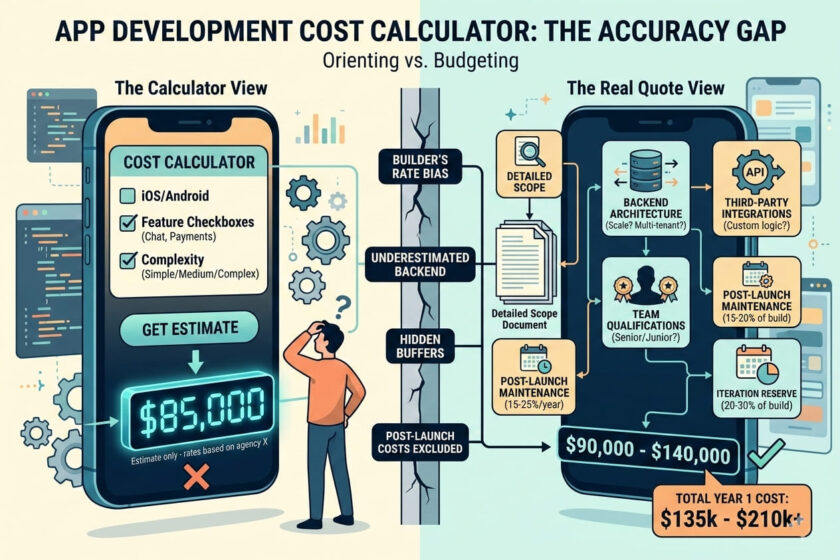
The honest answer is: both, depending entirely on which calculator, what inputs you provide, and — critically — what you plan to do with the number it gives you. Some calculators are genuinely built from real project data and can get you within 10–15% of a real quote. Many others are back-of-envelope multiplication wrapped in a slick UI, and treating their output as a budget is how projects blow up financially.
This guide cuts through it. We looked at how the major app development cost calculators work under the hood, tested their accuracy claims against real 2026 market data, identified exactly where they go wrong, and explained when they’re actually worth using — and when you’re better off skipping them entirely.
How App Development Cost Calculators Actually Work
Most people treat cost calculators like search engines – put in your query, trust the answer. That’s not how they work, and understanding the mechanics is the fastest way to understand their limitations.

The Basic Calculation Most Calculators Use
Hours × Rate – and Everything That Formula Misses
Under the hood, almost every app development cost calculator runs a version of the same formula:
Total Cost = Development Hours × Hourly Rate
That’s it. Feature selections map to hour estimates from a lookup table the agency built. The hourly rate is usually fixed to the agency’s own billing rate, the region they’re pitching to, or a market average. Add a buffer for QA, project management, and design — which may or may not be visible to you — and that’s the number on screen.
The formula itself isn’t wrong. It’s actually how agencies price projects internally. The problem is that every variable in it has enormous uncertainty when applied to a project that hasn’t been scoped yet. How many hours does ‘real-time chat’ take? One team says 80 hours. Another says 200. Both are defensible depending on architecture decisions that haven’t been made yet. The calculator has to pick one.
Note: Discover the real App Development Cost in 2026, Complete Breakdown for Startups and avoid costly mistakes. Get expert insights and budget smarter today.
Traditional vs. AI-Powered Calculators
What the Newer Generation of Tools Actually Does Differently
The traditional calculator asks you to classify your app as ‘simple,’ ‘medium,’ or ‘complex,’ select features from a checklist, and multiply. More detail produces more variance, not necessarily more accuracy — Upstack Studio (Dec 2025) specifically notes that ‘more detail isn’t always better as detailed inputs can make the estimate less accurate because too many unnecessary options are selected.’
AI-powered calculators — ScaleupAlly’s, Ptolemay’s estimation tool, and a few others — take a different approach. They compare your inputs against databases of completed projects: feature selection, platform choice, complexity tier, and team composition are matched to historical actual costs from real builds. Ptolemay’s tool, for example, draws on data from 10,685 completed app projects to generate its estimates (Ptolemay, 2025). When the inputs are detailed and the project type is well-represented in the historical data, this approach can get genuinely close to reality.
ScaleupAlly claims their AI calculator achieves 5–10% accuracy against real market rates when inputs are precise (ScaleupAlly, Aug 2025). That’s a meaningful improvement over a traditional dropdown-based calculator — but it still depends entirely on the quality of what you put in.
Note: Looking for mobile-app-development-services that deliver real results? Trusted by growing brands. Limited slots available—get started today
The Accuracy Gap – What Calculators Get Right and What They Miss
Let’s be specific about where calculators are reliable and where they fall apart, because both are real. The answer is not ‘calculators are useless’ – that’s too simple and wrong in important ways.
What Cost Calculators Are Actually Good At
The Genuine Value You Can Extract From Them
For ballpark scoping, calculators work. If you put in ‘iOS app, 12 screens, Stripe payments, push notifications, user authentication’ and get back an estimate of $60,000–$90,000, that number is telling you something useful: this is not a $15,000 project, and it’s probably not a $200,000 project either. That orientation — ruling out the obviously wrong budget ranges before you spend time talking to agencies — is legitimate value.
Calculators are also genuinely useful for comparison. If you run the same project through three different agency calculators and one comes back at $40,000 while two others return $80,000–$100,000, that’s a signal worth investigating before you sign with the cheapest option.
And they’re useful for feature triage. Adding a feature to the calculator and watching the estimate move by $8,000 immediately focuses the conversation about whether that feature belongs in version one. That’s not a precise number, but the directional logic is sound.
Where They Break Down – The Six Accuracy Killers
The Variables No Calculator Can Honestly Account For
Here’s where the gap opens up between calculator output and real quotes. These aren’t edge cases — they’re normal project variables that calculators systematically fail to capture.
1. Calculator Bias Toward the Builder’s Own Rates
Every agency calculator is calibrated to that agency’s cost structure. Upstack Studio puts it plainly: ‘a custom app development calculator is an oxymoron… our calculator only really works at estimating development costs by Upstack Studio, and even then, it can underestimate’ (Upstack Studio, Dec 2025). A Bangalore agency’s calculator will return Bangalore rates. A New York agency’s calculator will return New York rates. Neither is wrong — but neither applies universally, and they can differ by 300–400%.
2. The What One Developer Calls ‘Basic’ Problem
‘Real-time chat’ as a feature selection means something different to every developer who built the lookup table behind that calculator. One team’s basic chat implementation — WebSockets, message storage, read receipts, push notifications — takes 160 hours. Another team’s equivalent takes 80. The calculator picks one assumption and presents it as fact. Upstack Studio flags exactly this: ‘what one developer considers a basic feature, another can treat as advanced, and both will assign correspondingly different development hours to it’ (Dec 2025).
3. Backend Complexity Is Almost Always Underestimated
Calculators are built by people answering the questions that non-technical clients know how to answer. Platform (iOS/Android), feature count, rough complexity — these are the visible tip. The backend architecture decisions underneath — single-tenant vs. multi-tenant database structure, synchronous vs. event-driven API patterns, stateful vs. stateless authentication, caching strategy — these have enormous cost implications that no feature checklist captures. Emizen Tech (Dec 2025) specifically identifies this as a systematic accuracy problem: ‘backend requirements are often overlooked in early planning.’
4. Third-Party Integration Complexity Is Treated as Flat Cost
Calculators typically have a line item for ‘payment integration’ or ‘third-party API.’ What they can’t account for is that integrating Stripe’s basic payment flow takes 20 hours, while integrating Stripe with subscription billing, usage-based metering, multiple pricing tiers, and proration logic takes 120 hours. Both look the same in a feature checklist. The difference is $5,000–$15,000 depending on your developer rate.
5. Hidden Buffers and Invisible Cost Lines
Some calculators build PM, QA, design iteration, and deployment costs into the hourly multiplier invisibly. Others don’t include them at all. You’re often comparing numbers that include fundamentally different things, with no way to know which. Upstack Studio acknowledges building QA, bug fixes, and design revision buffers into their rates ‘invisibly’ — which makes their output incomparable to a calculator that shows those lines separately (Dec 2025).
6. Post-Launch Costs Are Almost Never Included
Every major 2026 market report puts post-launch maintenance at 15–25% of initial build cost per year. The app itself is only 40–60% of total first-year cost when you include hosting, iteration, bug fixes, and OS compatibility updates. Of the major calculators reviewed for this piece, only one (Choicely’s free sheet) explicitly flags the lifetime cost picture. The rest give you a development quote and leave the rest undiscussed. That’s not a small gap — it can be the difference between a sustainable budget and a project that runs out of money three months after launch.
3. Accuracy by Calculator Type – What the Data Says
Instead of naming individual tools and ranking them (which becomes outdated quickly), here’s how the major categories of calculator perform against real-world quotes, based on 2025–2026 sources:
| Calculator Type | Accuracy vs. Real Quote | Best Use Case | Key Limitation |
| AI-powered with detailed inputs (Ptolemay, ScaleupAlly) | 5–10% accuracy claimed; requires precise feature inputs (ScaleupAlly, Aug 2025; Ptolemay, 2025) | Pre-discovery budget orientation for well-defined projects | Degrades badly with vague inputs; still reflects builder’s rate bias |
| Feature-based dropdown calculator (Sphinx, Digitalya, Clavax) | ±20–40% in best conditions; ±50–80% with vague inputs (Upstack Studio, Dec 2025) | Comparing feature cost tradeoffs; identifying budget range | ‘Complex/medium/simple’ categories absorb all meaningful variance |
| Quick 5-question estimator (Digitalya, Agicent) | Rough directional only — ±50% considered normal | Confirming whether a project is ≈$20K or ≈$200K before a single call | Insufficient inputs for meaningful accuracy; lead-gen primary purpose |
| Hourly rate × hours templates (spreadsheet-based) | Accurate if you know actual hours; useless if estimating hours | Internal tracking when scope is already defined in detail | Circular — requires the information you’re trying to estimate |
| Agency-produced estimate after discovery call | ±10–20% for well-run agencies (Emizen Tech, Dec 2025) | Actual budget planning and contract preparation | Requires time investment; still varies significantly by agency |
The Real Numbers – What Apps Cost in 2026 Without a Calculator
The best cross-check for any calculator output is real market data. Here’s what multiple 2026 sources put app development costs at — these are verified ranges you can use to sanity-check whatever number a calculator returns.
Cost by App Complexity – Verified February 2026
Multi-Source Cross-Referenced Ranges
| App Type | Cost Range (USD) | Timeline | Sources |
| Simple app — calculator, utility, single feature | $8,000–$50,000 | 1–3 months | topflightapps.com (1 week ago); Sphinx Solutions (2026) |
| Mid-complexity — fitness, basic e-commerce, event app | $50,000–$150,000 | 2–5 months | appinventiv.com (Jan 2026); Groovyweb (5 days ago) |
| Complex — marketplace, fintech, social platform | $150,000–$400,000 | 5–12 months | appinventiv.com 2026; topflightapps.com 2026 |
| Enterprise-grade — healthcare, banking, AI-heavy | $300,000–$500,000+ | 9–18+ months | Multiple 2026 sources; Groovyweb (5 days ago) |
| AI/ML-integrated app — GPT-4o integration, fine-tuning | $30,000–$150,000+ | 4–10 months | Ptolemay 2025 citing CB Insights; Groovyweb 2026 |
| MVP (lean, single-platform, core feature only) | $20,000–$60,000 | 6–11 weeks | Ptolemay (2025) — analysis of 1,086 real projects |
If a calculator returns a number well outside these ranges for a comparable app type, that’s a red flag worth investigating. Either the calculator is using unusual rate assumptions, the scope was entered incorrectly, or the output is unreliable. Cross-referencing against market data is one of the most useful things you can do with a calculator result.
Developer Rates by Region – What Calculators Should Be Using in 2026
The Rate Inputs That Drive Every Calculator’s Output
Since every calculator ultimately multiplies hours by a rate, the regional rate assumptions baked into the tool are the biggest single driver of output variance. Here are verified February 2026 rates:
| Region | Mid-Level Rate | Senior Rate | Source |
| North America (agency) | $80–$150/hr | $120–$250/hr | Groovyweb (5 days ago); topflightapps.com (1 week ago) |
| Western Europe (UK, Germany) | $64–$108/hr | $108–$150/hr | index.dev 2026 |
| Eastern Europe (Poland, Romania) | $45–$70/hr | $70–$110/hr | Multiple 2026 sources |
| India (agency billing rate) | $22–$45/hr | $45–$80/hr | Groovyweb 2026 — ‘$22/hr starting rate’ |
| Southeast Asia | $15–$30/hr | $30–$55/hr | Ptolemay 2025; Adalo 2026 |
| AI-first agency team (India-based, senior engineers) | $22–$50/hr | $50–$100/hr | Groovyweb (5 days ago) — AI Agent Teams |
The practical implication: a calculator built by a US agency returns output based on $120–$180/hr. A calculator built by an Indian agency returns output based on $22–$50/hr. Run the same project through both and you’ll get estimates that differ by 300–500%. Neither is wrong — they’re just quoting for their own team. Understanding this is the most important thing you can know about calculator accuracy.
5. The Five Things a Calculator Cannot Tell You
These aren’t edge cases. They’re the core project questions that determine whether an app succeeds — and none of them are answerable by a cost calculator, regardless of how sophisticated it is.
Whether Your Architecture Will Scale
Cost and Architecture Are the Same Decision, and Calculators Ignore Architecture
Single-tenant or multi-tenant database? Monolith or microservices? Synchronous REST or event-driven messaging? These decisions determine both your upfront development cost and your infrastructure bill for the next five years. A calculator that asks ‘simple, medium, or complex’ is not engaging with these questions. It’s grouping wildly different architecture requirements under the same label and pretending the cost implications are similar. They aren’t.
A well-architected mid-complexity app that handles multi-tenancy correctly costs more to build initially but significantly less to operate and extend. A poorly architected version of the same feature list costs less upfront and dramatically more after launch. Calculators price the feature list, not the architecture. That’s a fundamental limitation.
Whether the Team Is Actually Qualified
A $60,000 Quote From a Senior Team Is Different From a $60,000 Quote From Juniors
Two agencies can return the same calculator estimate and deliver radically different products. The calculator has no way to evaluate the team’s track record with your app category, their QA process, their code review practices, or whether the person managing your project has shipped anything comparable before. Digitalya (2023) puts it directly: ‘a price calculator can’t tell you all these details… while it gives you a rough estimate, this only covers the price perspective.’
This is why calculator output should be treated as a starting number, not a final filter. An agency that comes in 20% higher than a calculator estimate but has three live apps in your category and a documented QA process is a better choice than an agency that hits the calculator number exactly but has never shipped a comparable project.
How Much Iteration You’ll Actually Need
The First Version Is Never the Final Version – and Calculators Only Price the First Version
Successful apps go through significant iteration post-launch. Ptolemay’s analysis of real projects found that most MVPs require meaningful scope adjustment after user feedback. The first version is a hypothesis. Post-launch iteration is where you find out which hypothesis was right. Calculators price the build. They don’t price the iteration that turns the build into a product people actually use.
Budget 20–30% of your development cost as a post-launch iteration reserve. Every market report that covers this recommends it. No calculator includes it automatically.
Your Actual Infrastructure Costs Over Time
The Monthly Bill That Starts the Day You Launch
AWS, GCP, and Azure costs are usage-dependent and scale with your success. A calculator that returns a $75,000 development estimate is telling you nothing about the $500–$5,000/month in hosting that starts on launch day, or the $300+/month in third-party service fees (analytics, error tracking, email, authentication). Over 24 months, infrastructure and tooling costs frequently exceed 50% of initial development cost. Calculators almost never surface this.
Whether Your App Is a Good Business
Cost Estimation Is Not the Same as Feasibility Analysis
Calculators will happily tally costs for an app that makes no business sense. A competitor with a larger team and five years of data has built what you’re describing, charges $5/month, and is losing money on it — a calculator doesn’t know that. Upstack Studio makes this point plainly: ‘calculators don’t account for whether your app could be profitable or how soon, and a cheap app that flops costs far more than a higher-cost build that does its job’ (Dec 2025). The number means nothing without the business case behind it.
6. When Calculators Deliver Their Best Results
The accuracy of a cost calculator isn’t fixed – it shifts dramatically based on what stage you’re at and how precise your inputs are. Emizen Tech (Dec 2025) makes a point worth taking seriously: calculators work best ‘when an app idea has reached a clear planning stage’ and when the user can input feature-level specifics rather than broad complexity tiers.
High Accuracy Conditions
The Four Inputs That Make Calculator Output Genuinely Useful
- You have a specific, defined feature list — not ‘something like Instagram’ but a list of named screens and functions
- You know your target platform (iOS, Android, cross-platform, web) before entering the calculator
- Your app type is well-represented in the calculator’s database — it’s a known category like e-commerce, fitness, or bookings
- You’re using a feature-level calculator (one that lets you select specific functions) rather than a complexity-tier selector
Low Accuracy Conditions — When You Shouldn’t Trust the Output
The Inputs That Produce Unreliable Estimates
- You selected ‘complex’ or ‘medium’ without specific feature definitions — complexity tiers absorb enormous variance
- Your app involves significant custom logic, unusual integrations, or regulated industries (healthcare, fintech)
- The calculator is from an agency in a different region from your intended development team
- You added every feature that looked relevant without prioritizing — ‘too many unnecessary options’ degrades accuracy (Upstack Studio, Dec 2025)
- You’re building something genuinely novel — calculators built on historical project data have no useful comparables for new categories
7. How to Use a Calculator Without Getting Burned
The problem isn’t that calculators exist. It’s that people use them at the wrong stage, with the wrong inputs, for the wrong decision. Used correctly, they’re a legitimate planning tool. Here’s the workflow that gets real value from them.
Step 1 — Use Multiple Calculators, Not One
The Spread Tells You More Than Any Single Number
Run your project through at least three different calculators — ideally from different regions and different agency types. If they cluster around a similar range, you’re in a relatively well-understood project category and the estimates are directionally reliable. If they diverge by more than 2x, that variance is telling you the project is either poorly defined or unusual enough that historical data doesn’t map cleanly to it. Both are useful signals before you talk to anyone.
Step 2 – Enter Specific Features, Not Complexity Tiers
The More Specific Your Inputs, the More Useful the Output
Don’t select ‘medium complexity.’ Select: user registration with email and Google OAuth, dashboard with three data visualisations, Stripe subscription billing with annual and monthly options, CSV export, in-app notifications, admin panel with user management. The more specific you are, the closer the calculator output comes to what an agency will actually quote you after a discovery call.
Step 3 – Treat the Output as a Hypothesis, Not a Budget
What the Number Is Actually Telling You
A calculator output of $85,000 means: ‘for a project with these characteristics, built by a team with this cost structure, the plausible range is somewhere around this figure.’ It’s a hypothesis. Your job is to test it against real quotes from two or three agencies. If three agencies quote $80,000–$100,000, the calculator was accurate. If they come in at $120,000–$150,000, the calculator missed something — usually integration complexity or compliance requirements — and you need to understand what.
Step 4 — Add the Lines Calculators Leave Out
Build a Complete Budget, Not Just a Development Quote
| Cost Category | Calculator Includes? | What to Budget Separately |
| Core development | Yes — this is what calculators quote | — |
| UI/UX design | Sometimes (varies by tool) | Add 15–20% of dev cost if not included |
| QA and testing | Sometimes (often invisible in multiplier) | Add 15–25% of dev cost if not included |
| Cloud hosting (Year 1) | Almost never | $1,200–$60,000/year depending on traffic |
| Third-party services (Year 1) | Never | $5,000–$20,000/year (analytics, email, auth, monitoring) |
| Post-launch maintenance | Never | 15–25% of initial build cost annually |
| Feature iteration (rounds 1–2) | Never | 20–30% of build cost as a reserve |
| Legal / compliance | Never | $2,000–$100,000+ depending on category |
| App Store fees | Almost never | $99/year (Apple) + $25 one-time (Google) |
9. The Right Way to Estimate App Development Cost in 2026
Calculators are one tool. They’re not the process. Here’s the full estimation workflow that actually produces reliable budget numbers:
- Start with a calculator — get a rough directional number and a framework for thinking about feature costs
- Run your project through 2–3 calculators from different regions to understand the rate variance
- Add the missing lines (hosting, maintenance, iteration, legal) using the multipliers above
- Book discovery calls with 2–3 agencies whose portfolios include similar apps — discovery calls are free
- Pay for a scoped discovery engagement ($3,000–$15,000) before committing to a full build — this converts a rough estimate into a real quote
- Treat any quote without a detailed scope document as a rough estimate, not a commitment
The discovery engagement is the step most founders skip because it feels like spending money before spending money. It’s also the step that converts a 40% accurate calculator estimate into a 10–15% accurate quote with a scope document attached. The cost of skipping it is usually measured in six-figure rework bills and delayed launches.