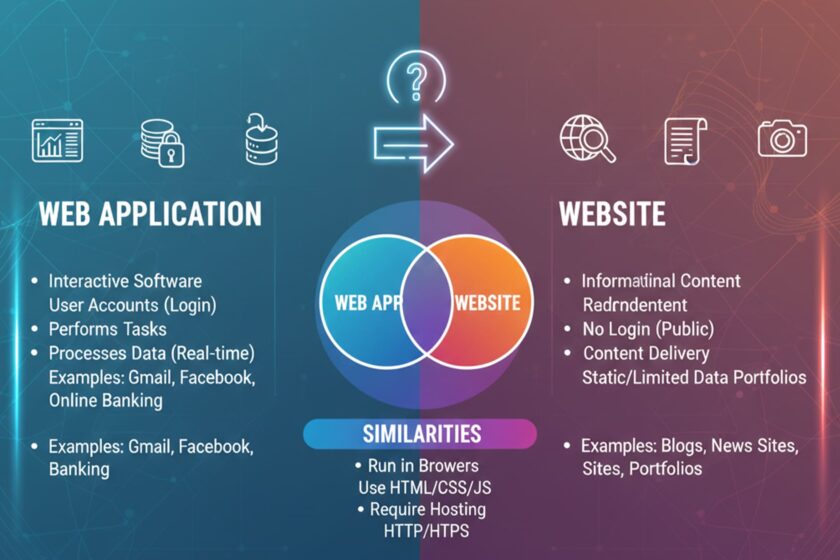
Difference Between Web Application and Website
If you’ve ever wondered about the difference between a website and a web application, you’re not alone. Many people use the terms interchangeably. Even in tech discussions, “web app vs website” debates pop up regularly.
Although websites and web applications can both be accessed via web browsers and hosted on the Internet, they serve different purposes and offer different ways for users to interact with them.
This guide will explain the differences between web applications and websites with easy-to-understand definitions, real-world examples, and industry-accepted standards. You’ll know the difference between a web application and a website, and when to use one over the other.
What Is a Website?

A website is a collection of publicly accessible web pages hosted on a server and accessed through a domain name.
MDN Web Docs (by Mozilla) describes how websites usually consist of structured content delivered to a web browser via HTML, styled with CSS, and may include additional functionality via JavaScript.
Key Features of Websites
Here are the some key features of website:
- Primarily informational
- Mostly static content (though modern sites may include dynamic elements)
- Limited user interaction
- No mandatory login for general access
- Focused on content delivery
Examples of Websites
News portals like BBC or The New York Times
- Company profile websites
- Portfolio websites
- Blogs
- Government information portals (e.g., usa.gov)
These platforms mainly deliver information rather than allowing users to manipulate data or perform complex tasks.
When Should You Choose a Website?
Choose a website if you:
- Need an online presence
- Want to showcase products or services
- Plan to publish blogs or informational content
- Don’t require complex user interactions
For small businesses and personal brands, a website is often enough.
What Is a Web Application?

A web application is interactive software that runs in a web browser and allows users to perform specific tasks.
Web applications interact with users’ input and databases in real time, unlike typical websites.
The World Wide Web Consortium (W3C) defines web applications as web-based software systems that use standard web technologies to deliver application-like experiences.
Key Features of Web Applications
Here are the some key features of web applications :
- High level of user interaction
- Requires login or authentication in many cases
- Performs specific functions
- Real-time data processing
- Often connected to databases
Examples of Web Applications
- Gmail
- Google Docs
- Online banking portals
- E-commerce dashboards
Interactivity is the primary distinction between a web application and a website.
When Should You Choose a Web Application?
- Choose a web application if you:
- Need users to log in
- Require real-time data processing
- Want to provide dashboards
- Plan to offer interactive tools
- Handle transactions or user-generated data
Startups offering SaaS products typically build web applications.
Note: If you’re planning to build a scalable and feature-rich web application for your business, explore our web application development services to see how we help startups and enterprises turn ideas into powerful digital products.
Web App vs Website: Core Differences Explained
Let’s simplify the difference between website and web application through a side-by-side comparison.
| Feature | Website | Web Application |
| Primary Purpose | Deliver information | Enable user interaction & tasks |
| User Interaction | Limited | High |
| Authentication | Usually not required | Often required |
| Data Processing | Minimal | Complex & dynamic |
| Integration | Rare | Often integrates with APIs & databases |
| Development Complexity | Relatively simple | More complex |
| Example | Company website | Online banking system |
This table clearly depicts the difference between a website and a web application.
Purpose and Functionality
The key components that differentiate a website from a web application are the functions they serve and how users interact with them.
Website: To Inform
Websites are traditionally where you go to find information. Users will visit a website to read or view content. Interaction with the site is normally done through page browsing.
Example:
When you visit a restaurant’s website (for example) to find their menu, location, and hours of operation, you are simply consuming the restaurant’s web content.
Web Application: To Perform
Web applications are designed to provide functionality that allows users to perform specific tasks. They allow users to input data and receive dynamic feedback based on their actions.
Example:
If you log into a food delivery dashboard to manage orders, update listings, or track deliveries, you are using a web application.
Level of User Interaction
Interaction marks a major difference between web app and website.
Website Interaction:
- Clicking links
- Watching videos
- Filling basic contact forms
Web Application Interaction:
- Uploading files
- Editing documents
- Processing payments
- Managing dashboards
- Real-time collaboration
Wikipedia primarily serves readers as a source of information. However, when creating or editing documents using Google Docs, you are engaging in web-based applications with Web 2.0 features.
Authentication and User Accounts
Most websites don’t require login credentials to access core information.
However, web applications typically require authentication because they typically store user-specific information.
For example:
- A university website provides course information publicly.
- The student portal (where grades are viewed) is a web application.
This distinction illustrates another key difference between a website and a web application: the presence of personalization features.
Complexity of Development
There is much greater technical complexity in web applications than in websites.
Website Development Often Involves:
- HTML
- CSS
- Basic JavaScript
- CMS platforms like WordPress
Web Application Development Often Requires:
- Front-end frameworks (React, Angular, Vue)
- Backend frameworks (Node.js, Django, Laravel)
- Databases (MySQL, PostgreSQL)
- API integrations
- Security layers
Web applications must adhere to strict security standards because they handle sensitive information (e.g., financial transactions). For example, online banking services must meet regulatory guidelines, such as the Payment Card Industry Data Security Standard (PCI DSS).
Content Updates and Maintenance
Website: Websites typically update content manually through CMS systems.
Web application: Web applications continuously update content dynamically based on user actions.
For example:
- A blog post remains the same for all readers.
- A project management tool dashboard looks different for every user.
Website vs Web Application: Real-World Scenarios
Let’s explore practical examples.
Scenario 1: E-commerce Platform
An online store like Amazon includes both:
- Product pages → Website component
- Shopping cart & checkout system → Web application component
Scenario 2: Educational Platforms
- A university homepage is a website.
- An LMS (Learning Management System) where students submit assignments is a web application.
Scenario 3: Government Services
- According to USA.gov, government portals provide public information through websites.
- For example, systems such as the IRS e-file system provide a web application that allows you to process submitted forms and access data securely.
Key Differences at a Glance
Below is an explanation of what a website and a web application are, and how they differ.
Website:
- Content-focused
- Informational
- Minimal interaction
- Faster to develop
- Lower development cost
Web Application:
- Functionality-focused
- Task-driven
- Personalized experience
- Requires backend systems
- Higher security standards
Similarities Between Website and Web Application
Despite the distinctions, they share similarities:
- Both run in web browsers
- Both use HTTP/HTTPS protocols
- Both rely on web technologies (HTML, CSS, JavaScript)
- Both require hosting and domain names
Understanding the similarities between websites and web applications makes it easier to see how the confusion between these two terms arose.
Final Thoughts: Web App vs Website
Understanding the difference between a website and a web application helps businesses to make informed digital decisions.
Here’s the quick summary:
- A website delivers information.
- A web application enables interaction and functionality.
A website is beneficial if most of your audience reads, searches, and learns from it. On the other hand, if your audience needs to log in, manage data, or perform actions, build a web application.
The decision you make will ensure a better product and experience for your users, as well as scalable growth in your business over time.
And next time someone casually mixes up “web app vs website,” you’ll know exactly how to explain the difference—with confidence.